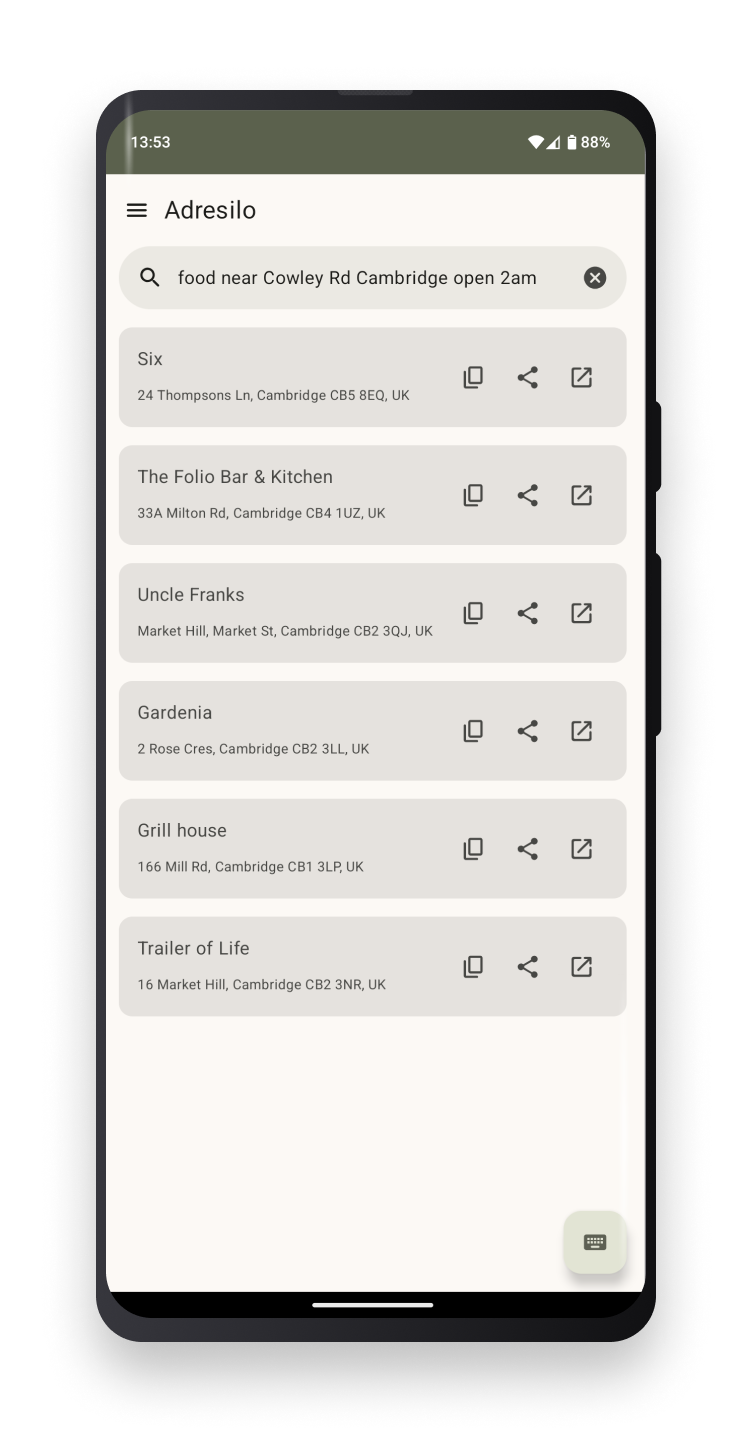
Search for places using natural language, then tap one of the icons on the right of a search result. The leftmost icon is Copy. Tapping it puts the place's coordinates in your clipboard for pasting into a calendar event, sending to a friend, etc. The middle icon is Share and opens Android's Share Sheet so you can send the place's name, address, and coordinates to other apps or contacts. The rightmost icon is Open. Tapping it opens the coordinates in any installed app that knows how to handle geo: Intent URIs. That includes e.g. Organic Maps, OsmAnd, Google Maps, Waze, and more.
You can use your own self-hosted https://git.sr.ht/~amolith/adresilo-server/ or buy codes to use our hosted server at https://adresilo.com
Screenshots
What’s new
Open geo: URIs from other apps
- Launch Adresilo directly from `geo:` links (e.g., geo:latitude,longitude or geo:0,0?q=query). This allows Adresilo to be a searching shim between, for example, calendar events with loosely-defined locations and navigation apps that might work best with coordinates. - If only a search query is provided (e.g., geo:0,0?q=Eiffel Tower), Adresilo will automatically perform a search for that query and display the results. - If coordinates are present in the li
How to install
Download the APK from the button at the top of this page.
Allow “Install unknown apps” for your browser or file manager only, not for every app.
Open the downloaded file and confirm the installation.
If installation fails with “App not installed,” remove an earlier build of the same app first. A signature conflict is the usual cause.
Data safety
Every file is checked against its published SHA-256 before it is listed.
Files are scanned for malware on every update.
The permissions each app requests are listed on its own page.
Read the full safety policy for how we test, flag, and delist files.